
My Brands
What is My Brands?
The My Brands section is where you set up and manage your own store network inside Pathzz BI.
- If you are a retailer or operator, this is where you add your brand and store locations.
- If you’re an investor, landlord or CRE agent, you can add tenant brands you want to analyze.
- Once created, your brand and its locations can be used across all Pathzz BI reports (Explore, Planning, Store Insight).
Initially, the My Brands section will be empty. You will need to create your brand and add store locations before running reports.
How to create a new Brand
You can create a brand either from the Dashboard → My Brands section or by going to My Brands → Manage.
Step 1 – Select or Create a Brand
Click Create Store icon or button. In the Your Brand dropdown:
- If your brand already exists in the list (e.g. a popular brand), select it.
If it does not exist, choose “Can’t find your Brand? Create a new Brand”.
Step 2 – Enter Brand Details
- Your Brand Name → Type your brand name.
- Industry → Choose the industry that best matches your business from the dropdown.
- Logo (optional) → Upload your brand logo.
Click Next to continue.
Step 3 – Add Store Locations
You can add store locations in two ways:
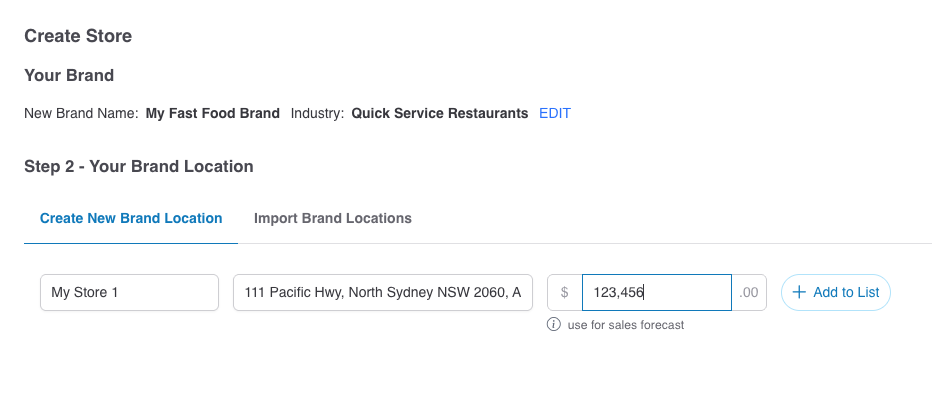
- Create New Brand Location → Enter store name and address manually. You can also add average monthly sales for forecasting.
- Import Brand Locations → Upload a csv or excel file with multiple store locations at once. Sample file is available to download on the page.
Each location will appear in the Store Location List with its name, address, and average monthly sales (if provided). Sale figures are required for Store Insight Report and Sales Forecast feature.
Click Submit when finished.
Next Steps
Once your brand and locations are created, Pathzz BI will process the data and perform a deep analysis. This may take a few minutes. After setup, you can:
- Run Explore Reports – evaluate your own stores against popular brands or candidate locations.
- Generate Planning Reports – identify and rank the best new locations for expansion.
- Create Store Insight Reports – uncover patterns and correlations across your store network to guide strategy (Sales Figure is required).
- Manage and update your brand – add, edit, or remove store locations anytime to keep your analysis current.